Scene lists, script breakdowns, shot lists, cast and crew rosters, schedules, call sheets, and templates — everything your production needs to move from greenlight to wrap, all in one place.
From the first script breakdown to the final call sheet — the Production module connects every part of your production into a single, living workflow.
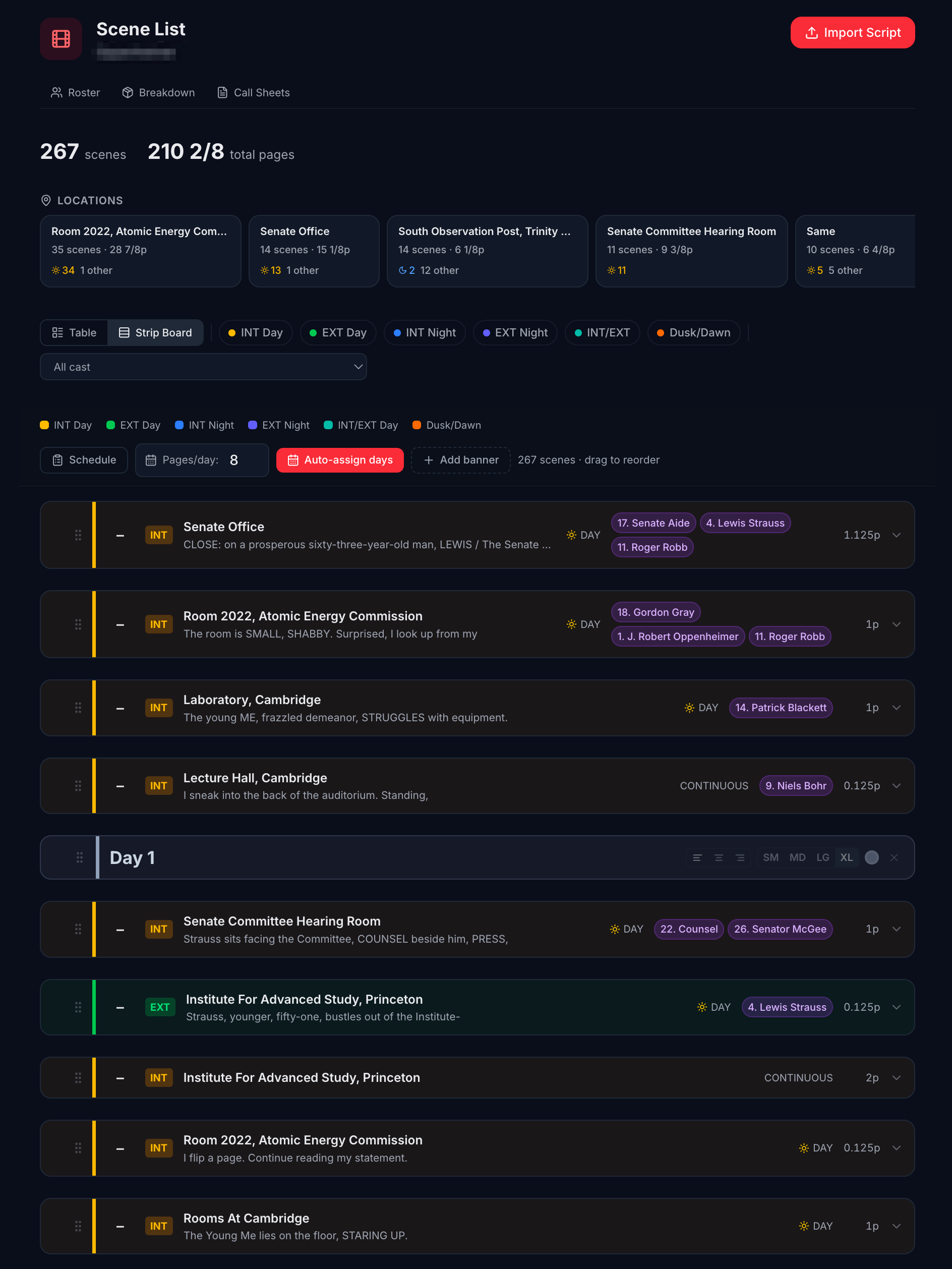
An intelligent scene list you can organise, reorder, and annotate. Add banners for shoot days, meal breaks, company moves — any structure your production needs.
Break down every scene into its component parts — characters, locations, props, special requirements, and department notes — structured and searchable.
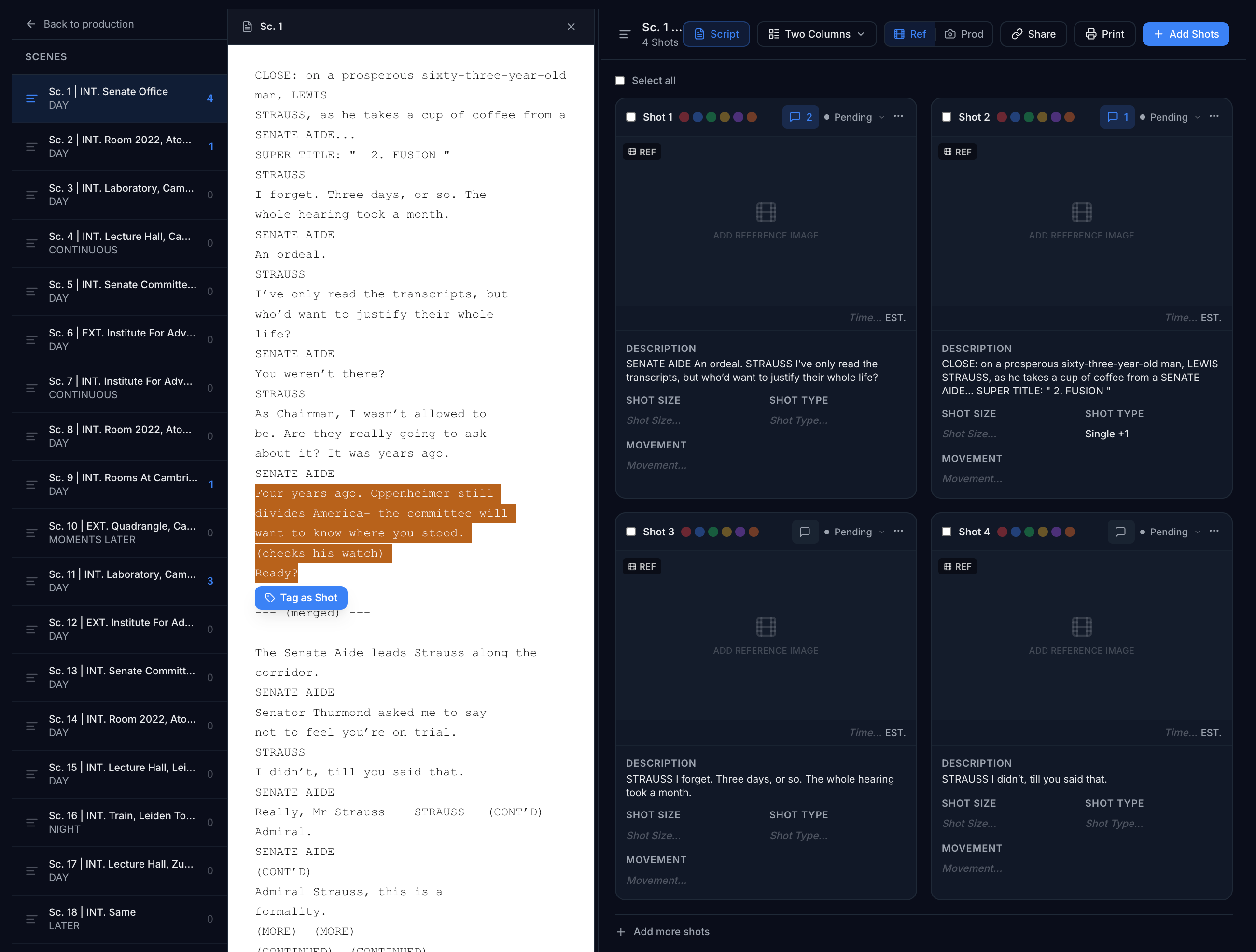
Create shots by highlighting script text directly. Switch between reference view for your director and production view for the floor — same data, different lens.
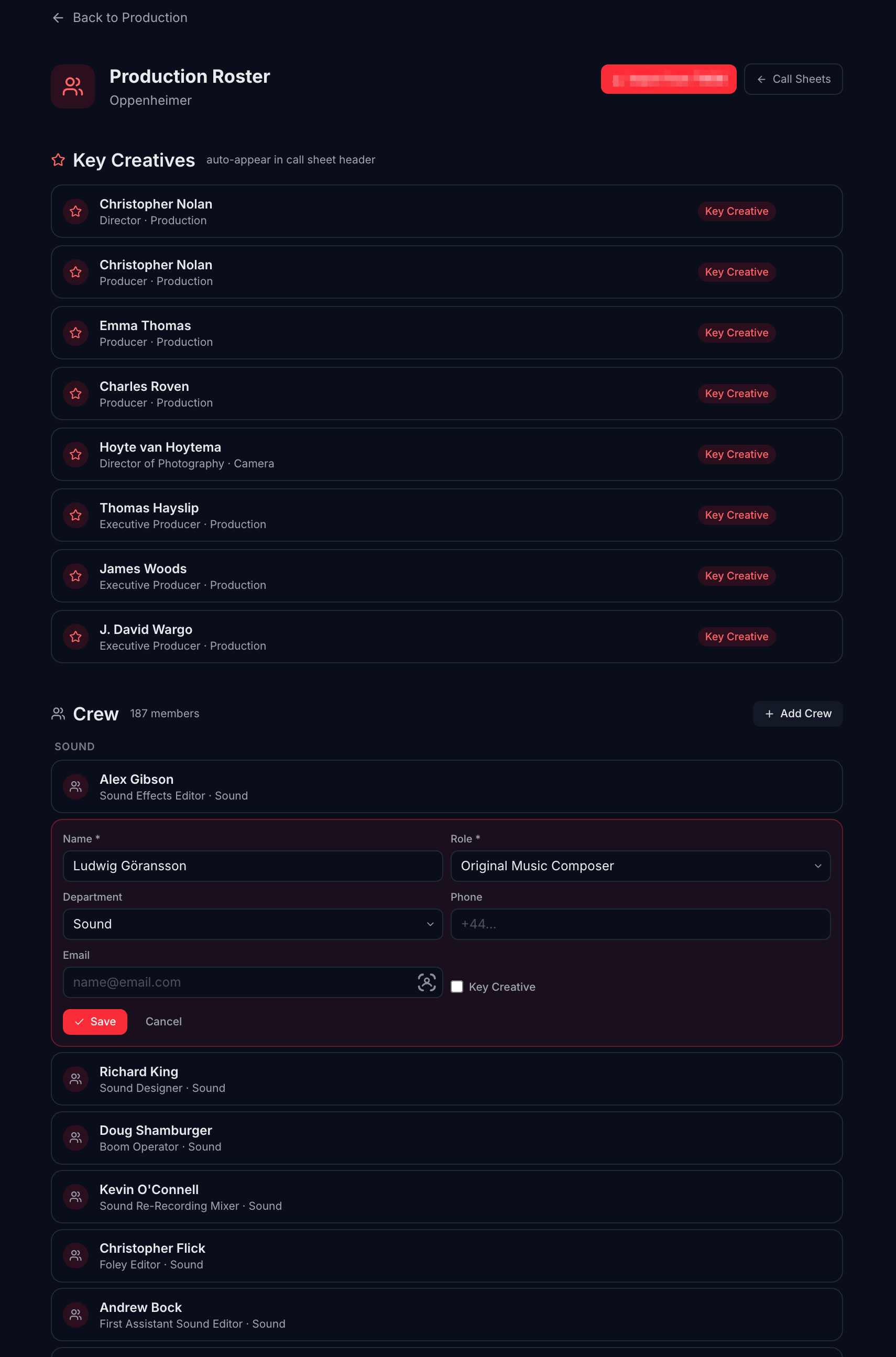
Your entire production roster in one place. Cast, crew by department, availability, and contact details — ready to build schedules and call sheets from real data.
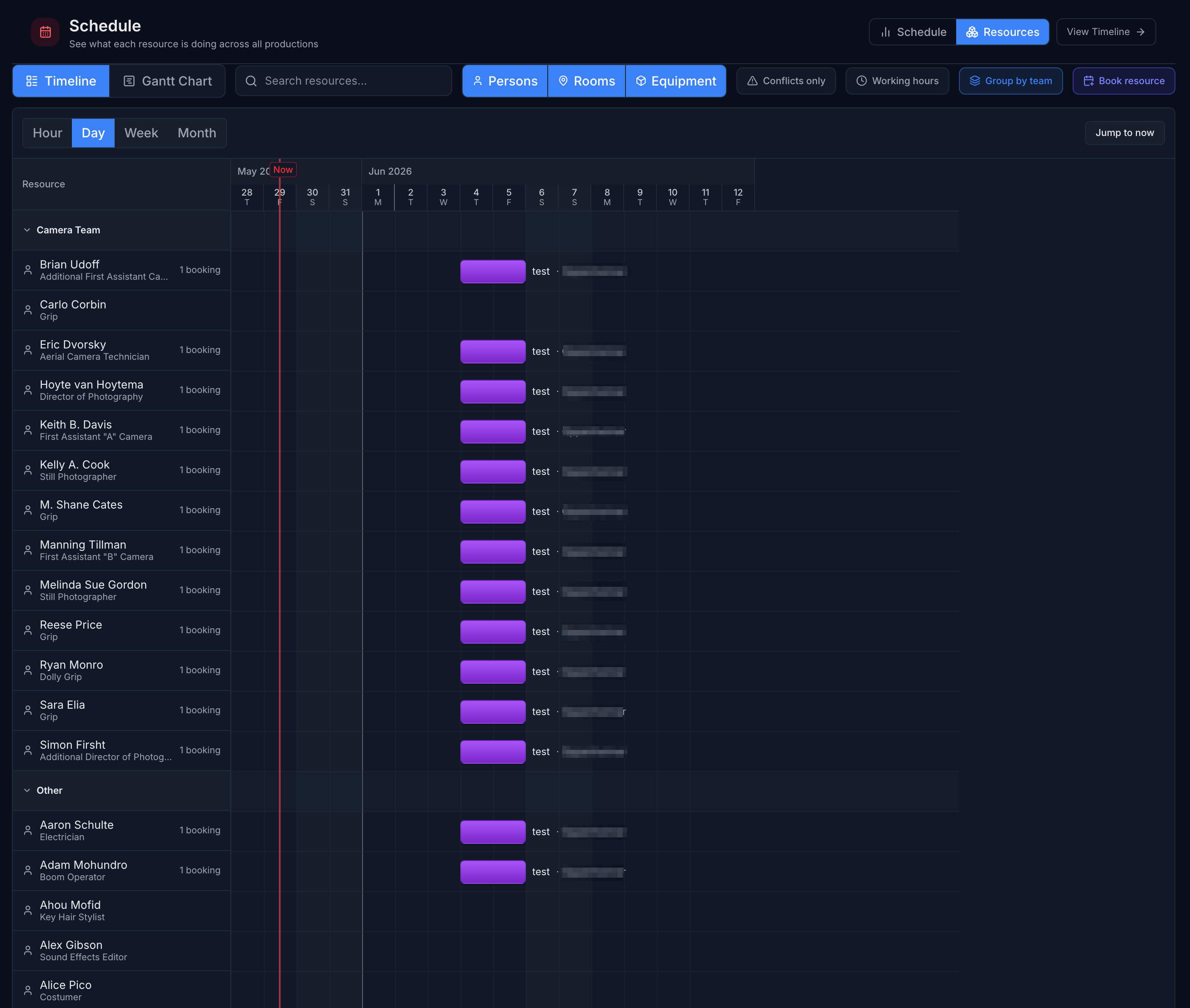
See every cast and crew member on a unified timeline. Spot availability clashes and workload gaps before they hit the floor.
Generate call sheets from your roster and schedule data. Apply organisation templates so every call sheet is consistent, every time.
The production hub gives you instant access to every part of your project — scene list, call sheets, roster, shot list, documents, and schedule. No hunting through folders. No asking what's where. It's all here.
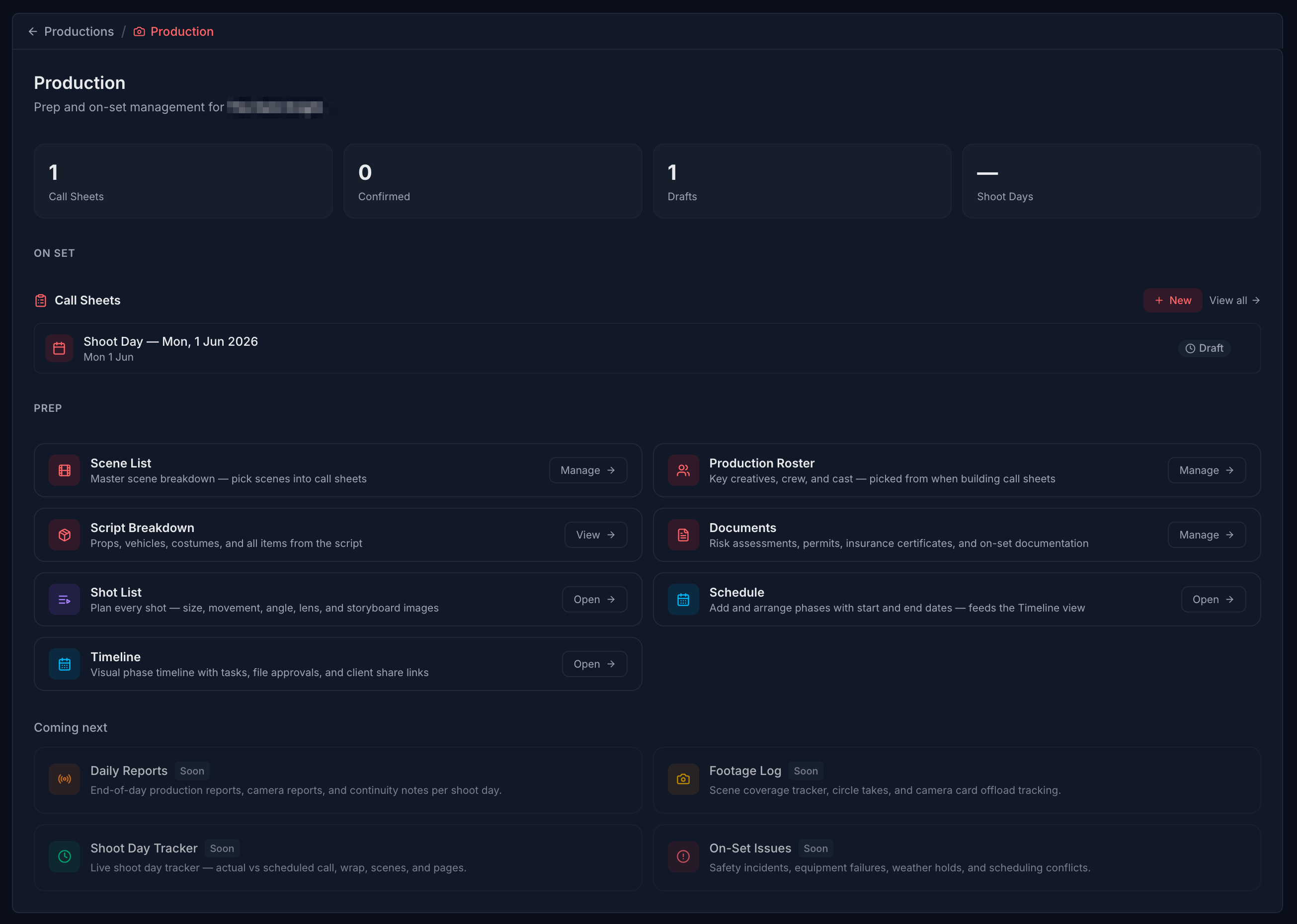
Jump straight to any area of your production — scenes, shots, roster, call sheets, documents — from a single screen. No menus to learn, no time wasted.
Scene breakdowns feed into shot lists. Roster data feeds into call sheets. Schedule changes ripple through automatically. Every module talks to every other.
Changes anywhere in your production instantly reflect across the platform. Every department is always working from the same real-time picture — no version confusion.
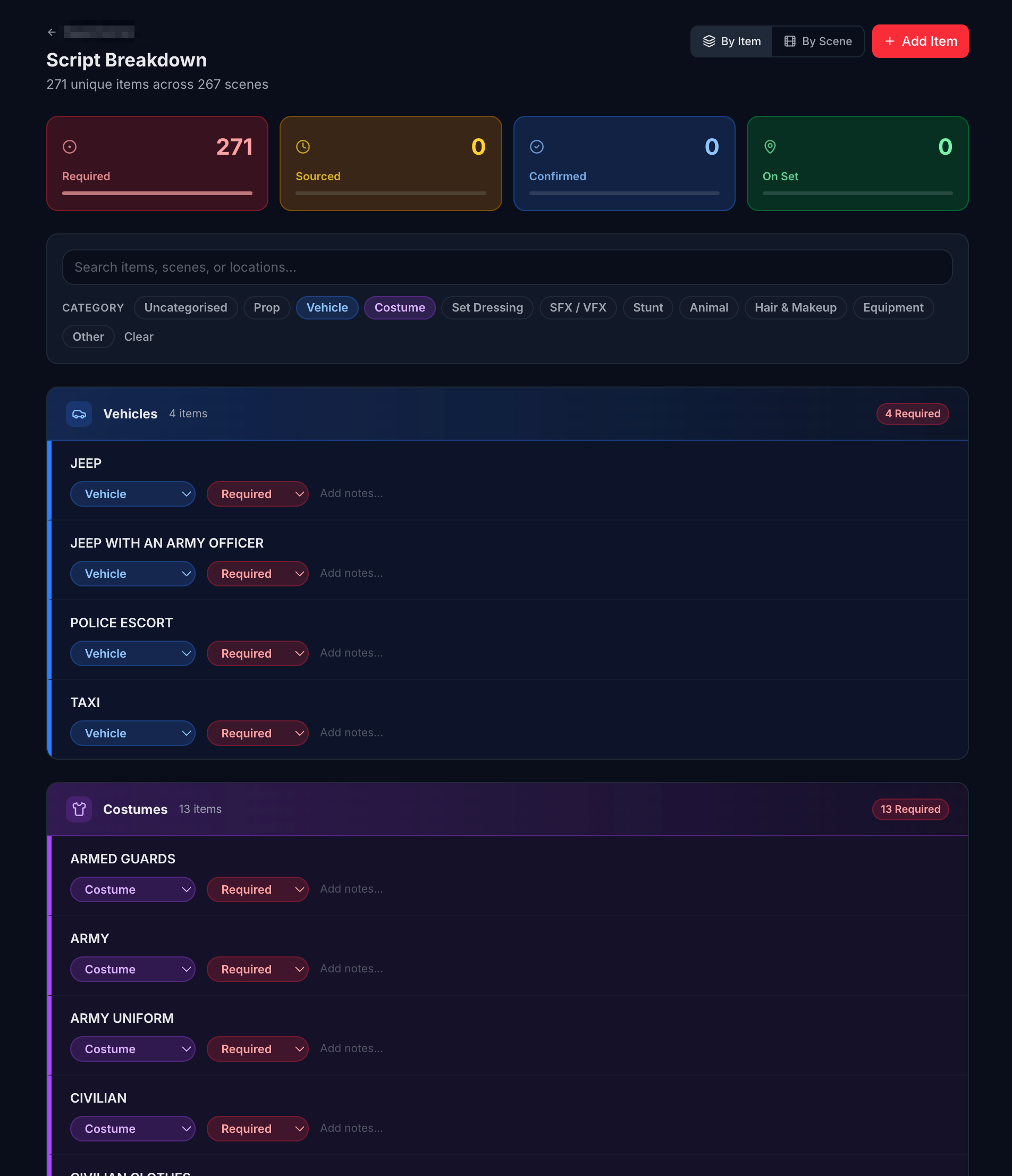
Break down your script scene by scene — characters, locations, props, practical requirements, and department notes, all captured in a single structured view. Every department sees exactly what they need before a single camera rolls.
Scene by scene, element by element. Every scene has its own breakdown — int/ext, day/night, characters required, and the specific elements each department needs to prepare.
Department clarity without the chase. Your AD, art department, and costume team all see their own relevant breakdown data without you emailing individual sheets to each of them.
Feeds directly into the scene list. Every breakdown entry connects to the scene list — so changes here flow through automatically, keeping everything consistent.
More than a stripboard. The scene list is the operational heart of your production — every scene, every shoot day, every element, in one intelligent view. It bends to how you work, not the other way around.
Insert banners between scenes for shoot days, meal breaks, company moves, travel, or anything your production needs. Structure your scene list to tell the full story of every shooting day.
Scene number, int/ext, day/night, location, characters, story day, estimated pages, and notes — all visible inline and editable without opening a separate screen.
Reorder scenes as your schedule evolves. Shuffle entire shoot days, individual scenes, or groups of scenes — the list adapts instantly and keeps all data intact.
Scenes are automatically grouped under their shoot day banners. See at a glance which scenes are filming on each day — no mental maths, no cross-referencing spreadsheets.
Find any scene instantly. Filter by location, character, int/ext, day/night, or any custom element. Especially useful when an actor or location becomes unavailable and you need to reschedule fast.
Track estimated pages per scene and per shoot day. See total page counts across your whole schedule so you can manage your days against your script length with precision.
Highlight any text in your script or breakdown and create a shot from it instantly. The context is captured automatically — add shot type, lens, notes, and camera movement, then choose how your team sees it.
Highlight to shoot. Select any passage of description, dialogue, or action in your script. Routine creates a shot entry from it in seconds — no re-typing, no copy-pasting.
Reference view and production view. Reference view gives directors and DPs a visual, creative layout. Production view gives floor crew the practical breakdown they need on the day. Same shots, presented for who needs what.
Everything in one ordered list. All shots across all scenes, in shooting order. Filter, sort, print, or share — your complete shot list is always ready.
Every cast member and crew role, organised by department, in a single roster. Availability, contact details, and scheduling data all in one place — so when it's time to build a call sheet, you're working from facts, not memory.
Cast and crew in one unified view. Actors, HODs, and department crew all in the same roster. Filter by department, role, or availability to find exactly who you need.
Schedule-aware availability. Roster data feeds directly into your production schedule and timeline. Spot conflicts before they become problems — not on the day.
Call sheet ready, always. Select the crew for any shoot day and generate their call sheet from the roster automatically. No re-entering names, numbers, or department details.
Your entire cast and crew on a single unified timeline. See who's needed, when, and for how long — and spot gaps and clashes before they reach the floor.
All cast and crew laid out horizontally across your shoot days. See your entire production's resource picture in one scroll — who's shooting when, and for how long.
Spot when the same person is needed in two places, or when a key crew member's availability doesn't cover a critical day. Identify conflicts during planning, not on set.
Click into any shoot day to see exactly who's called, which scenes are filming, and what the call time is. Your schedule and your call sheets stay perfectly in sync.
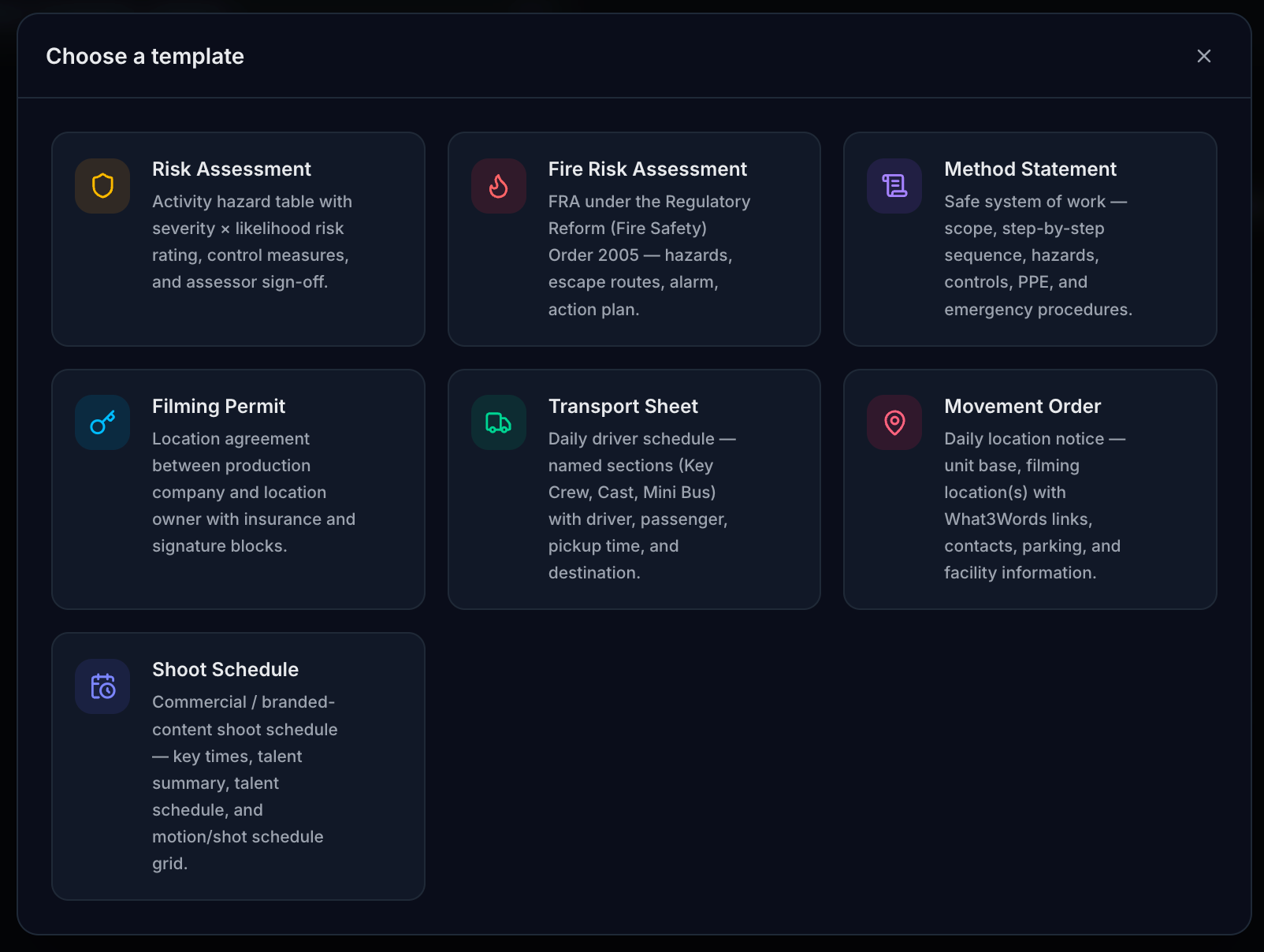
Build templates for call sheets, breakdown sheets, and production documents that match exactly how your organisation works. Apply them to any new production and everything is pre-configured from day one — no setup, no copy-pasting from last year's project.
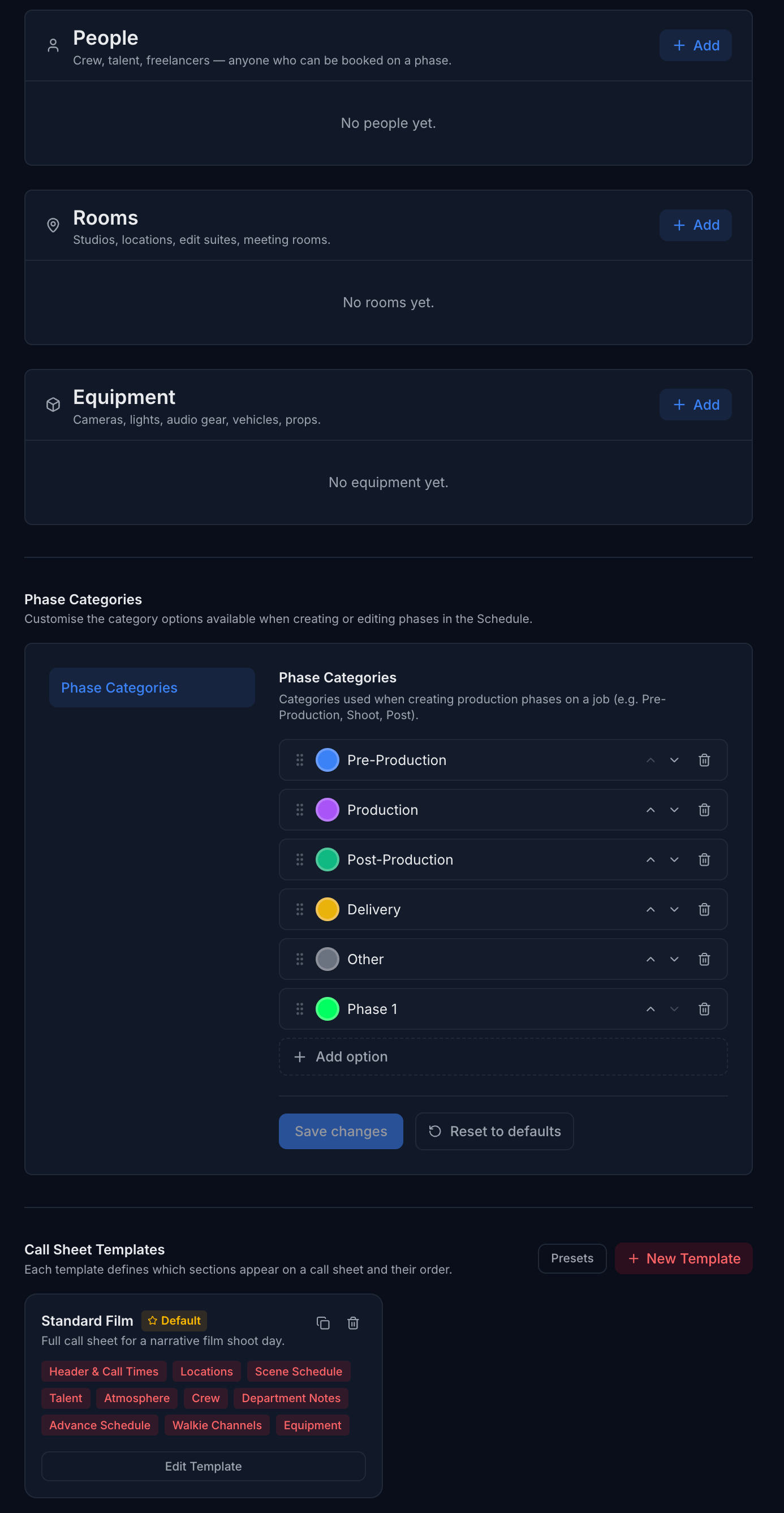
Call sheet templates. Define your standard call sheet layout, required sections, and fields once. Every call sheet generated on Routine will follow that structure automatically.
Fully customisable per organisation. Every template belongs to your organisation — not to a single production. Different studios using Routine have completely separate template libraries. Nothing bleeds between accounts.
Instant production setup. Start a new production and your templates are already there, ready to apply. The whole structure your organisation relies on is available immediately — no rebuilding from scratch.
Set up resources, categories, and call sheet templates exactly as your production requires. From camera packages to department categories — every setting lives at your organisation level, so every production you run inherits the same consistent, pre-built configuration.
Resource management. Define the equipment, vehicles, facilities, and crew types your productions use. Track availability across shoot days from one central configuration that stays consistent across every project.
Categories your way. Build your own production categories and sub-categories. Organise scenes, shots, and crew exactly as your workflow demands — not how a rigid template forces you to.
Organisation-level, fully isolated. Every configuration lives at your organisation level — consistent across every production you run, and completely separate from other studios using Routine. Your setup is yours alone.
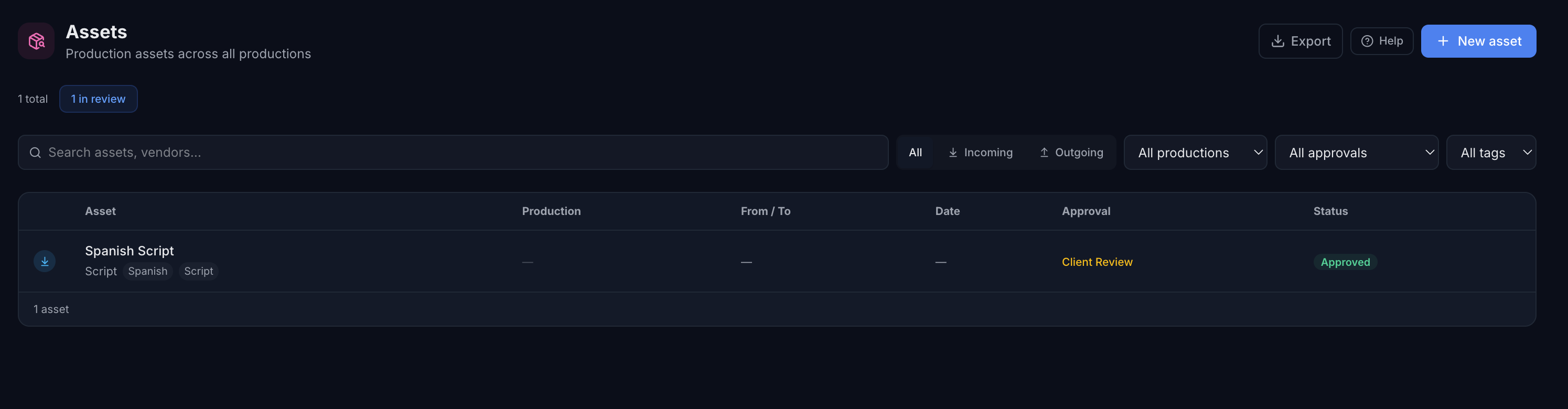
Scripts, schedules, storyboards, camera tests, rough cuts — production generates a huge volume of assets and keeping track of them usually means chasing emails and sifting through shared drives. The Production module gives you a dedicated place to log, track, and manage every asset your production creates or receives.
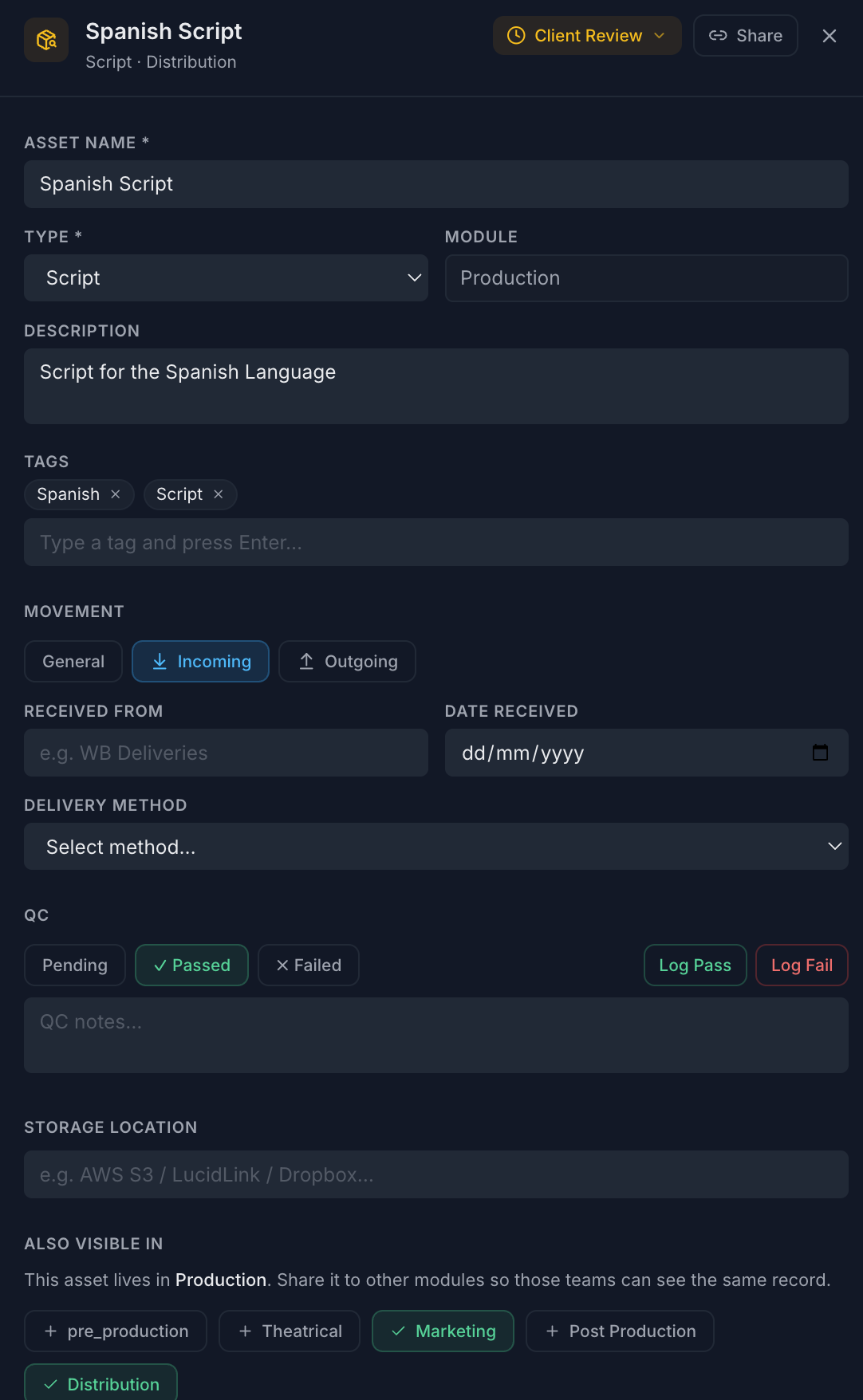
Log incoming and outgoing. Record every asset your production sends or receives — from raw footage deliveries to script revisions — with direction, source, delivery method, and date all captured in one record.
Full approval workflow. Move any asset through a built-in approval pipeline — draft, internal review, client review, approved. No separate email thread needed.
QC tracking built in. Log QC pass or fail against any asset, add notes, and keep a timestamped record of who reviewed what — and when.
Tag and find anything instantly. Add custom tags to every asset so your whole production library stays searchable, even at scale.
Click any asset to open a full detail panel — no page navigation required. Every field, every attachment, and the complete activity history lives right there alongside your asset list.
Attach QC reports, delivery notes, and supporting documents directly to the asset record. Everything in one place, no hunting through folders.
Generate a secure public link for any asset. Send it to a client or collaborator for review — no login required on their end.
Every status change, QC result, and note is timestamped and logged automatically. A complete audit trail without any extra effort.
If your studio runs more than one Routine module, you can share any production asset directly to your Post Production or Distribution team's view. One record, visible to the right people — no copy-pasting, no version drift. Studios on a single module won't see this option at all.
Sharing an asset to another module doesn't duplicate it. Both teams see the same record, the same status, the same files.
Share or unshare with a single click from the asset drawer. Instant — no export, no re-upload, no email.
Each module's team sees the asset in their own assets page, alongside their own assets — in the context they work in.
The sharing UI only appears if your organisation has multiple modules. No clutter, no confusion for teams that don't need it.
Tell us about your project and your team — we'll be in touch to get you set up.