🗄 Archive module

Every element.
One register.

An archive outlives every release. Negatives, masters, LTO sets, DCP drives, the hero prop — in vaults and labs around the world, usually tracked on a spreadsheet nobody fully trusts. Routine's Archive module is one register for all of it: where each element is, its status, how it got there, and what the facility is charging you to keep it.

What's inside

The register, the facilities, and the vendors who run them.

Film and media elements beside props and costumes, with a movement log that owns the truth and a no-account link for every facility.

🗂

One register, two kinds

Film and media elements — negatives, DSM and DCDM masters, IMF packages, LTO sets, DCP drives — beside production items such as props, costumes and documents. Status, shelf and when each one last moved, with lineage between them.

🔁

Movements own the truth

An item's place and status change only through a movement — a deposit, a pull, a dispatch, a return, a loan. Direct edits are refused, so the history is always true and a stock count can be reconciled against it.

🏛

Facilities and shelves

Each vault, lab or warehouse with its address, hours, climate, account and a nested location tree — vault, cage, rack, shelf. QR labels are minted by the database; scan onto a target shelf from a camera or a typed code.

📨

Retrieval requests

Ask a facility for elements by a needed-by date. The request goes by email, the facility confirms it, and the dispatch and receipt write the movements. Chasers run automatically towards the date.

🔗

The vendor link

One no-account link per facility. The vendor confirms and dispatches requests, logs deposits for you to confirm, reports checks done and pastes stock reports — the same ladder your own buttons press.

💷

Rate cards and storage costs

Pull, retrieval, handling and storage rates per facility; charges totalled per currency and hidden from crew; and expected storage worked out from the movement log beside what the facility actually invoiced.

Register

One register, two kinds.

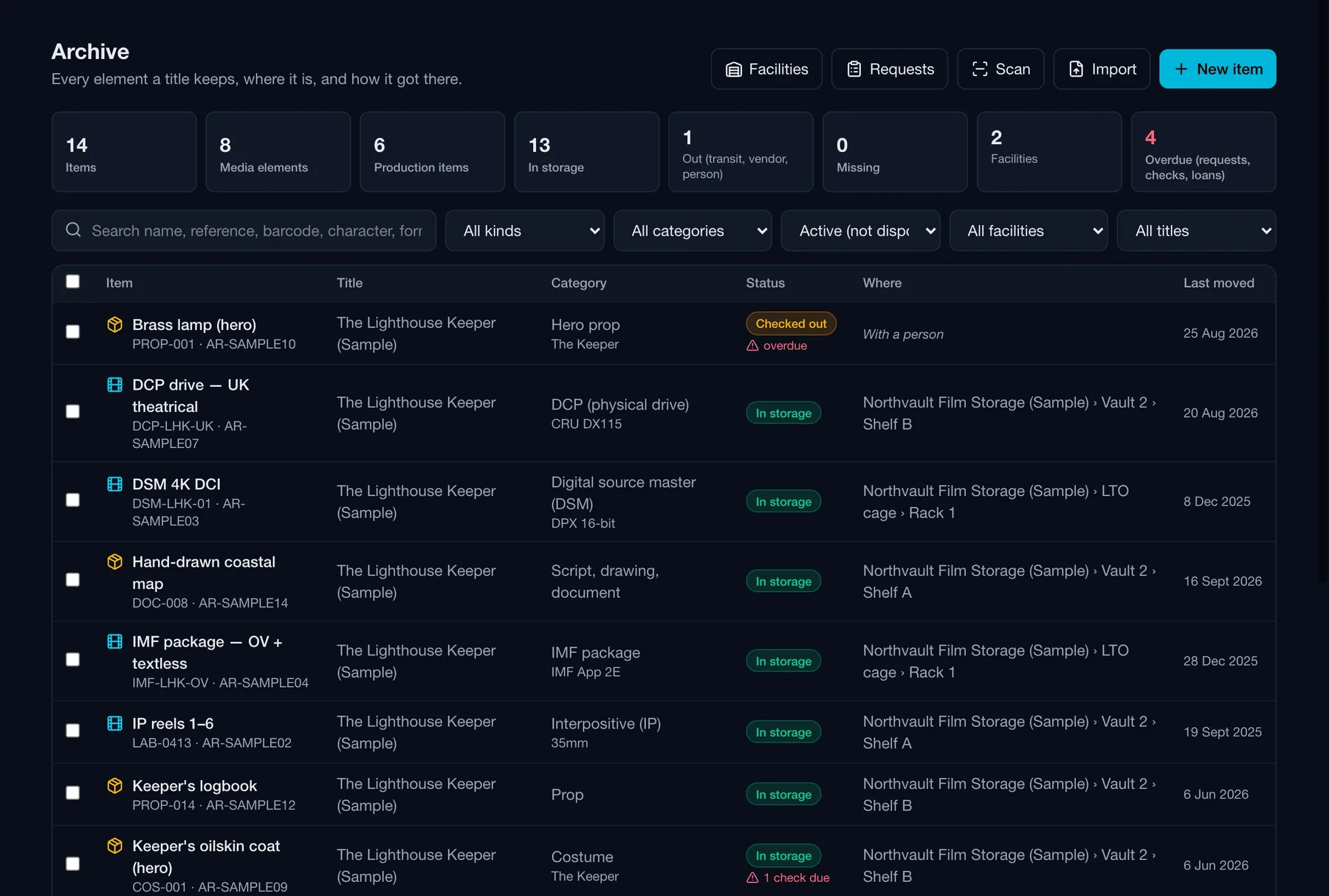
Everything a title keeps on one list: film and media elements beside props and costumes. Where each one is, its status — in storage, out to a vendor, checked out to a person, missing — and when it last moved. Filter by kind, category, status, facility or title; import from CSV with a dry run that refuses rather than guesses.
Archive · Register
Routine archive register listing film and media elements and production items with title, category, status, facility and shelf, and last-moved date, with counts of items in storage, out, missing and overdue
Items

A DCP, described like a DCP.

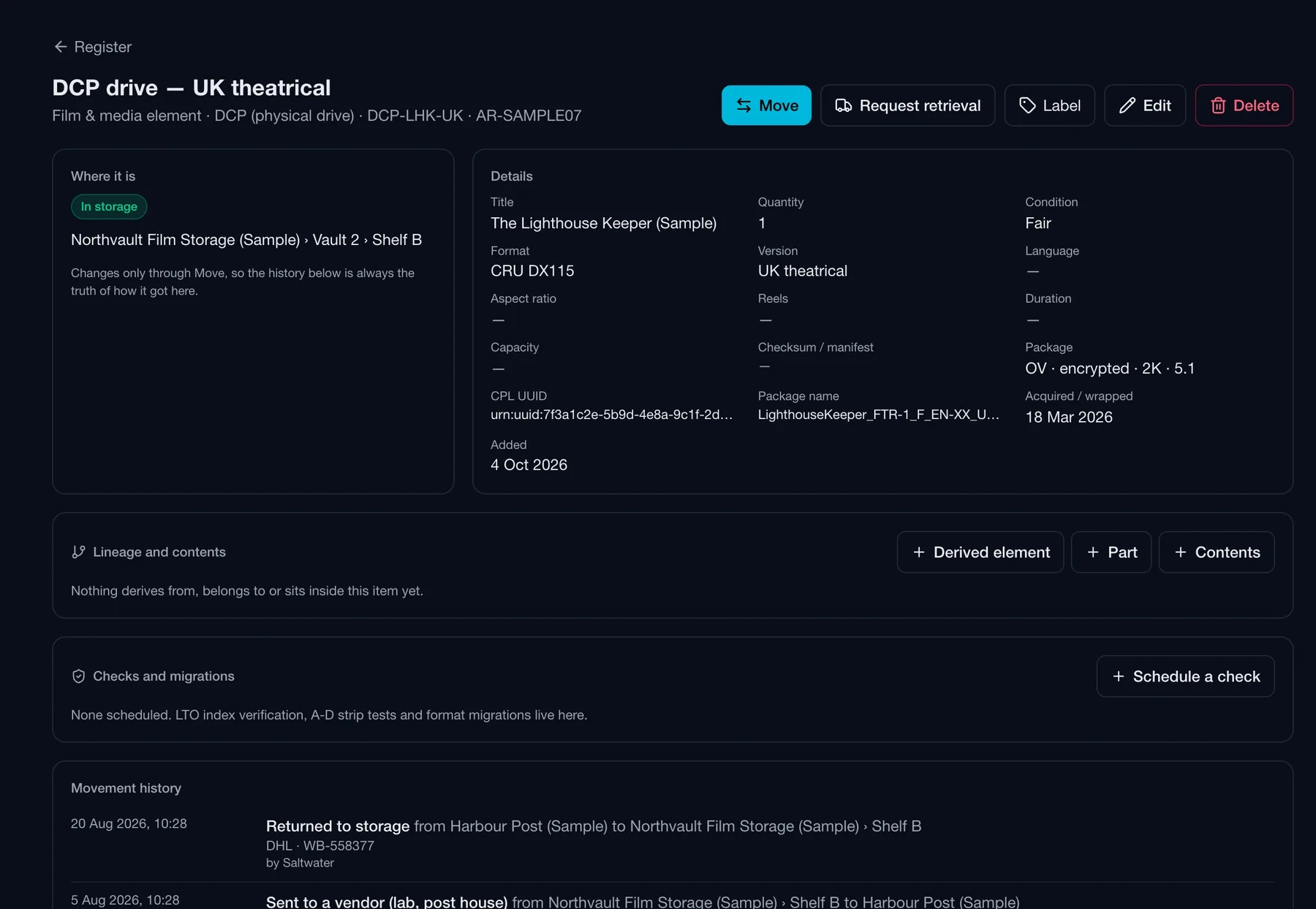
A DCP drive carries what a DCP archive actually searches by: the CPL UUID, the package name, OV or VF, whether it is encrypted, audio configuration and resolution — and a link to the Distribution version whose page lists its elements. Lineage and contents show what derives from an item, what it is part of and what sits inside it.

Place changes only through Move. The movement history underneath is the truth of where an item has been; a direct edit of its location is refused by the database.

Checks and migrations. Schedule an LTO index verification, an A-D strip test or a format migration per item; done ones roll forward to the next due date.

Labels and scanning. AR- codes minted by the database, printed as QR labels, scanned from a camera or typed onto a target shelf.

Archive · Item · DCP drive — UK theatrical
Routine archive item page for a DCP drive showing its facility and shelf, CPL UUID, package name, OV encrypted 2K details, lineage and contents, checks and the movement history
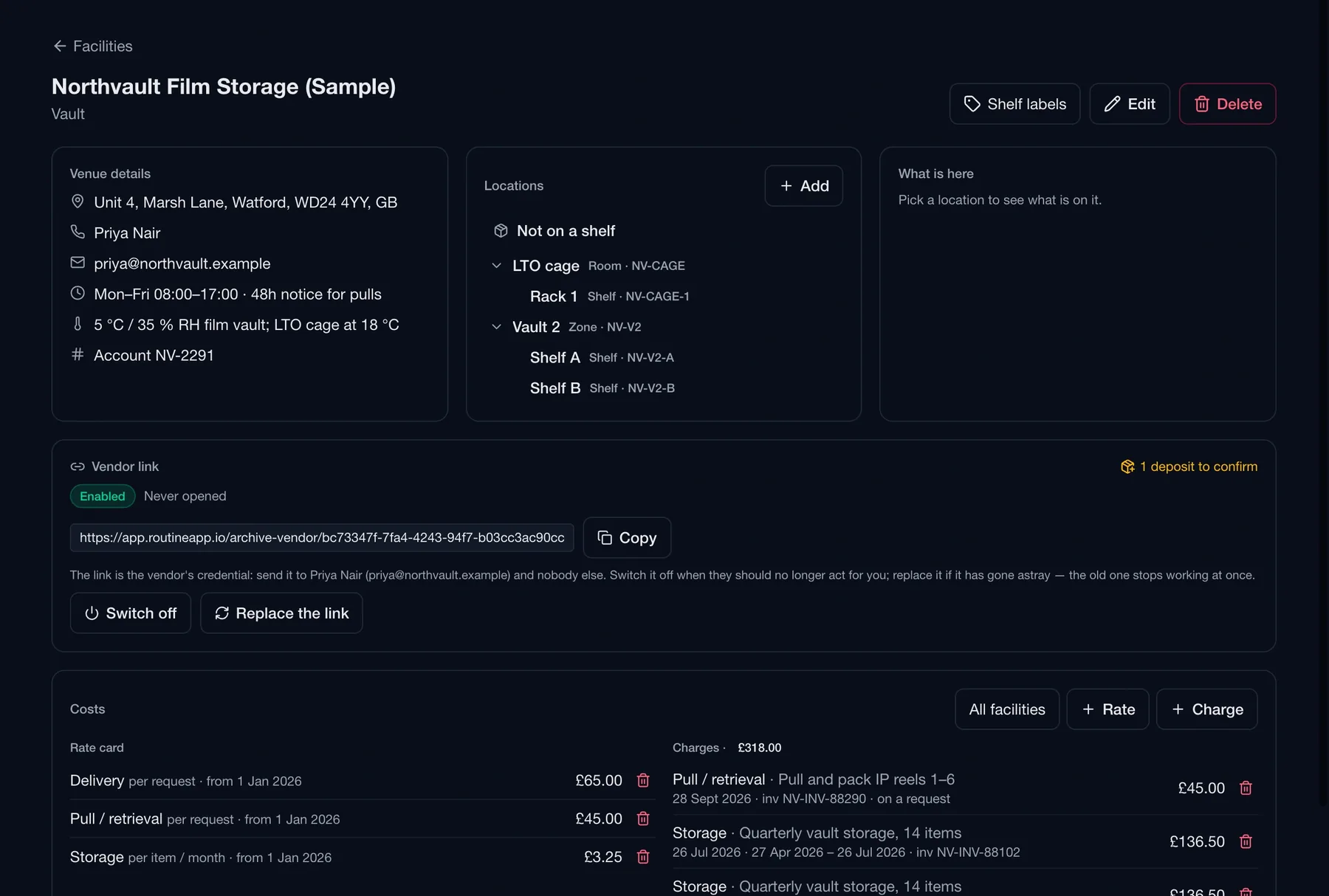
Archive · Facilities · Northvault Film Storage
Routine archive facility page showing venue details, a nested shelf tree, the vendor link controls, and a rate card with charges
Facilities

The facility, and its vendor link.

Each facility has its venue details — address, hours, notice for pulls, climate, account reference — a shelf tree, a rate card and the charges it has raised. And one no-account link for the vendor who runs it, which you can switch off or replace at any time.

A shelf tree, not a free-text field. Vault, cage, rack, shelf: a nested location tree per facility, so a move goes to a real place and a count can compare shelf against shelf.

Rate card and charges. Delivery, pull and storage rates with the date they apply from; charges logged against the facility and totalled per currency.

One link per facility. Sent to the vendor's named contact. If it has gone astray, replace it and the old one stops working at once.

Retrieval requests

Send the request to the vendor.

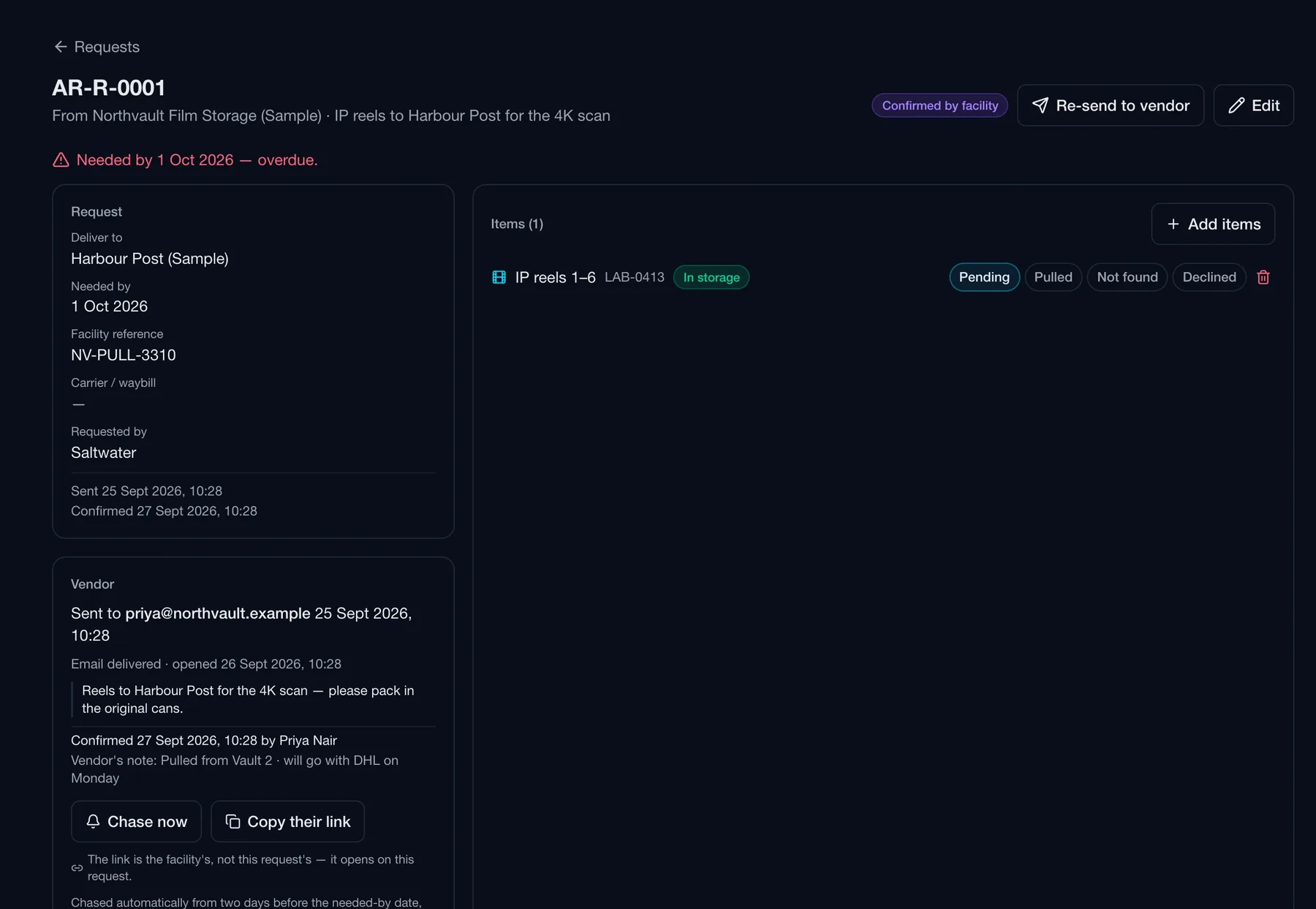
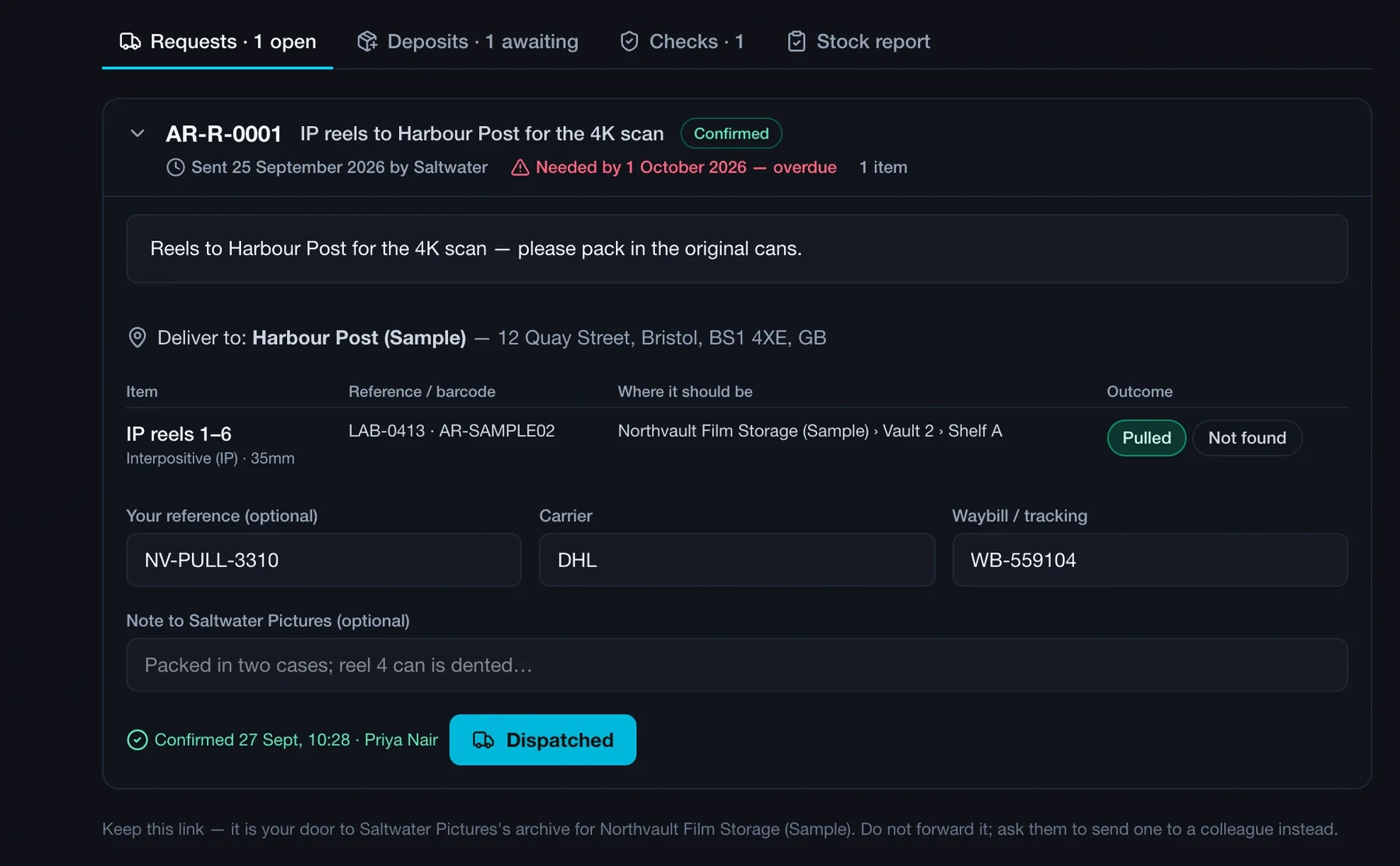
A retrieval request names the items, where to deliver them and the needed-by date, and goes to the facility by email. You see when it was opened, when they confirmed, their reference and their note — and they are chased automatically towards the date. On their link, the vendor marks each item pulled or not found, adds the carrier and waybill, and presses Dispatched.

Archive · Requests · AR-R-0001
Routine archive retrieval request page showing the items requested, delivery destination, needed-by date, the facility's confirmation with their reference and note, and chase controls

Your side. Deliver to, needed by, the facility's reference; sent, opened and confirmed timestamps; the vendor's note; chase now or copy their link.

Vendor link · Northvault Film Storage · Requests
The vendor's page for a retrieval request with each item marked pulled or not found, carrier and waybill fields, a note to the studio and a Dispatched button

The vendor's side. Pulled or not found, carrier and waybill, Dispatched — the same ladder, pressed by them, writing the same movements your own buttons would.

Deposits

Nothing is an item until you confirm it.

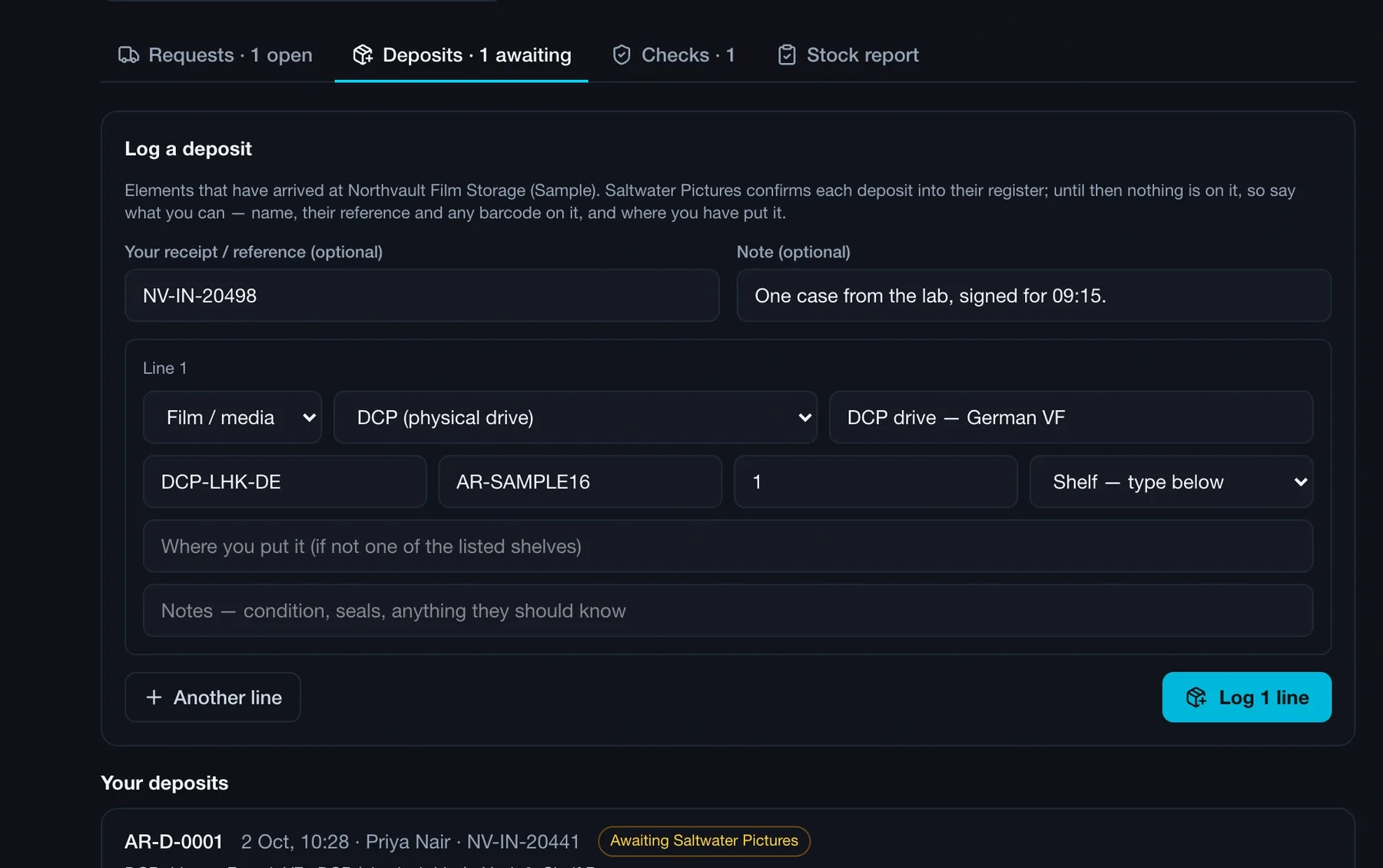
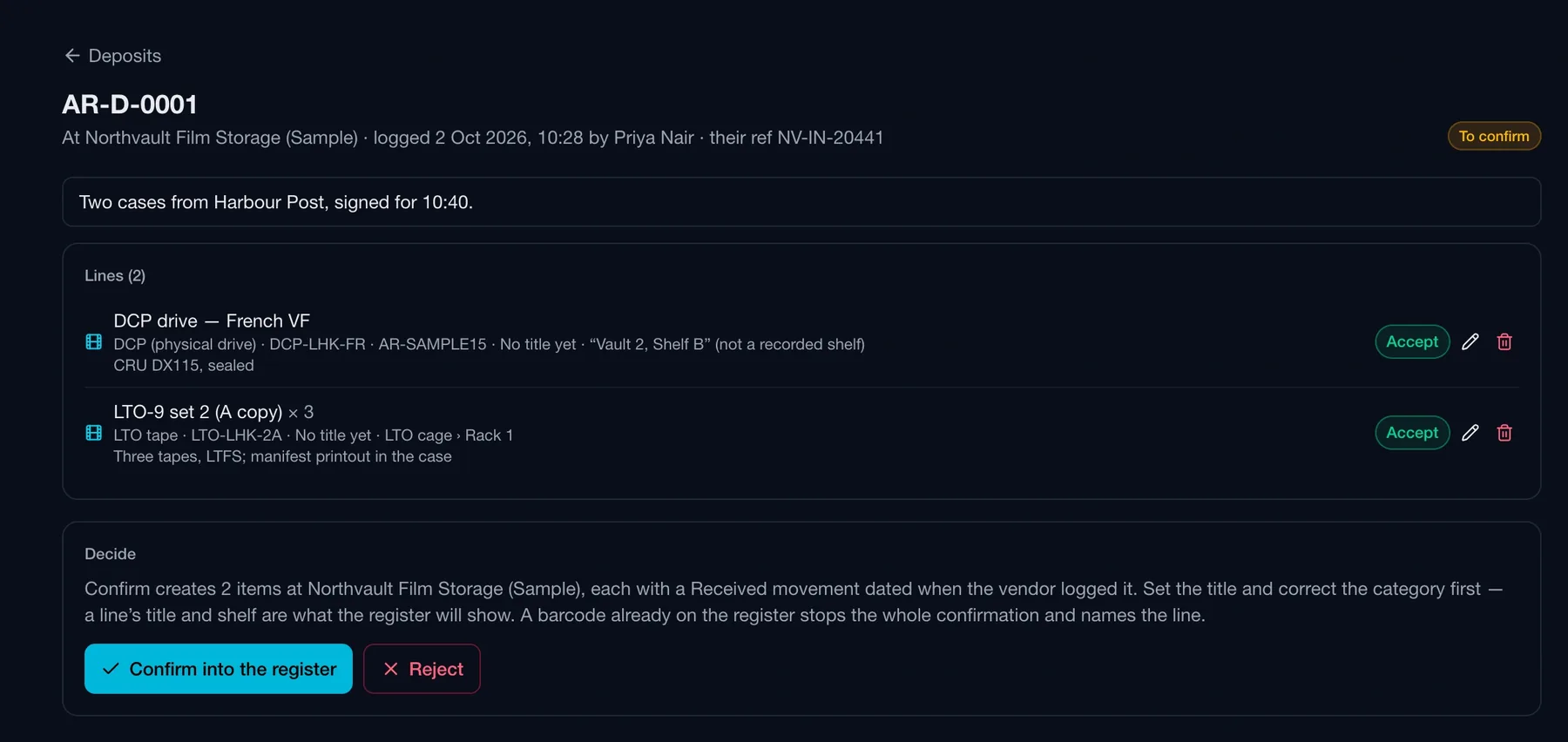
When elements arrive at the facility, the vendor logs a deposit on their link — name, reference, barcode, the shelf they put it on. Nothing is on your register until you confirm it: correct the category, the title and the shelf, and each line becomes an item with its opening movement, dated when it arrived.

Vendor link · Northvault Film Storage · Deposits
The vendor's deposit form with receipt reference, note, and a line with kind, category, name, reference, barcode, quantity and shelf

What arrived, logged by the vendor. Kind, category, name, reference, barcode, quantity and shelf per line, with their receipt reference and a note — and a list of their earlier deposits awaiting you.

Archive · Deposits · AR-D-0001
Routine archive deposit review page listing two lines with accept actions and a confirm-into-the-register or reject decision

Confirm into the register. Accept, correct or reject each line; confirm creates the items at that facility with a Received movement dated when the vendor logged it.

Stock counts

Reconciled against the register.

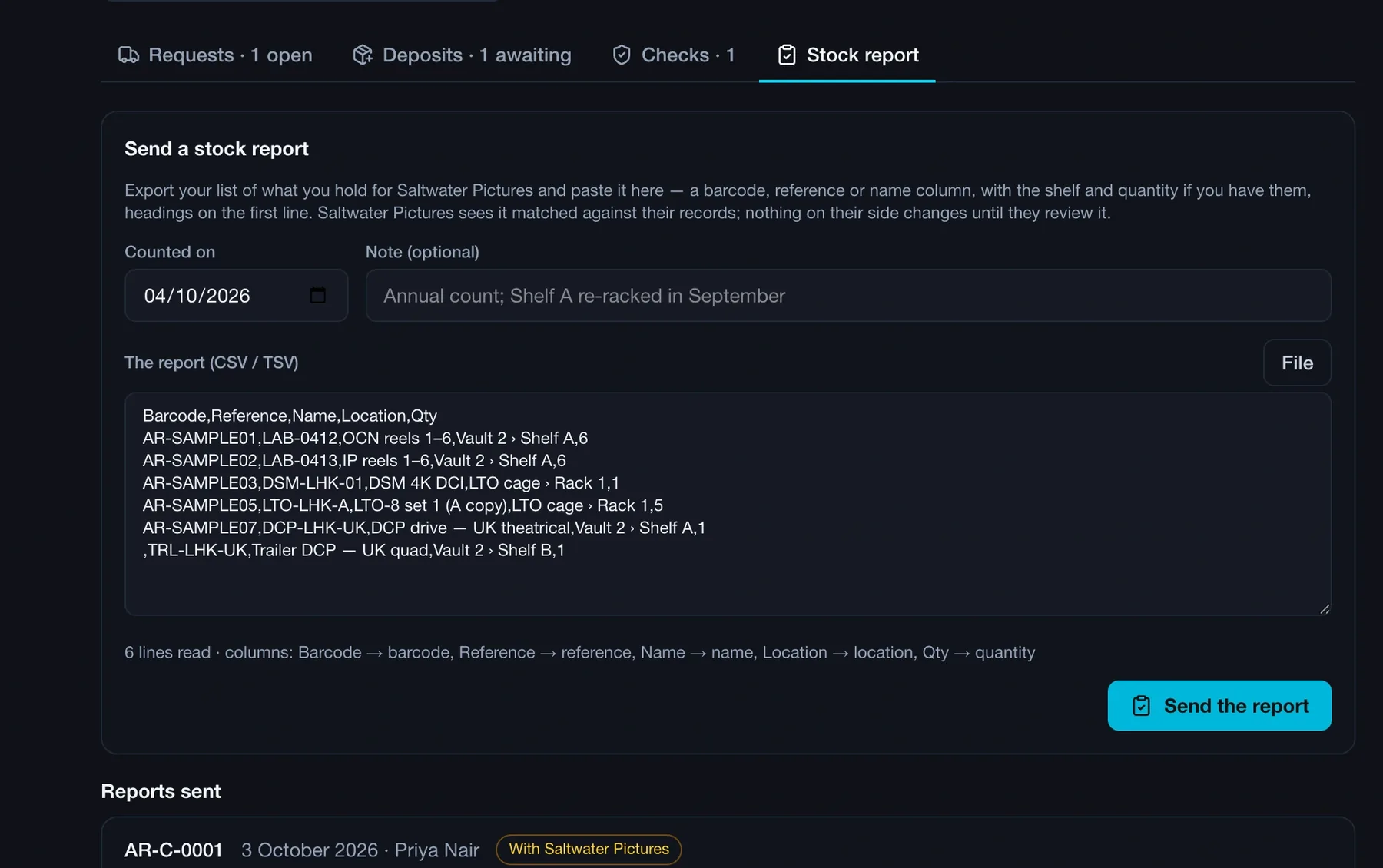
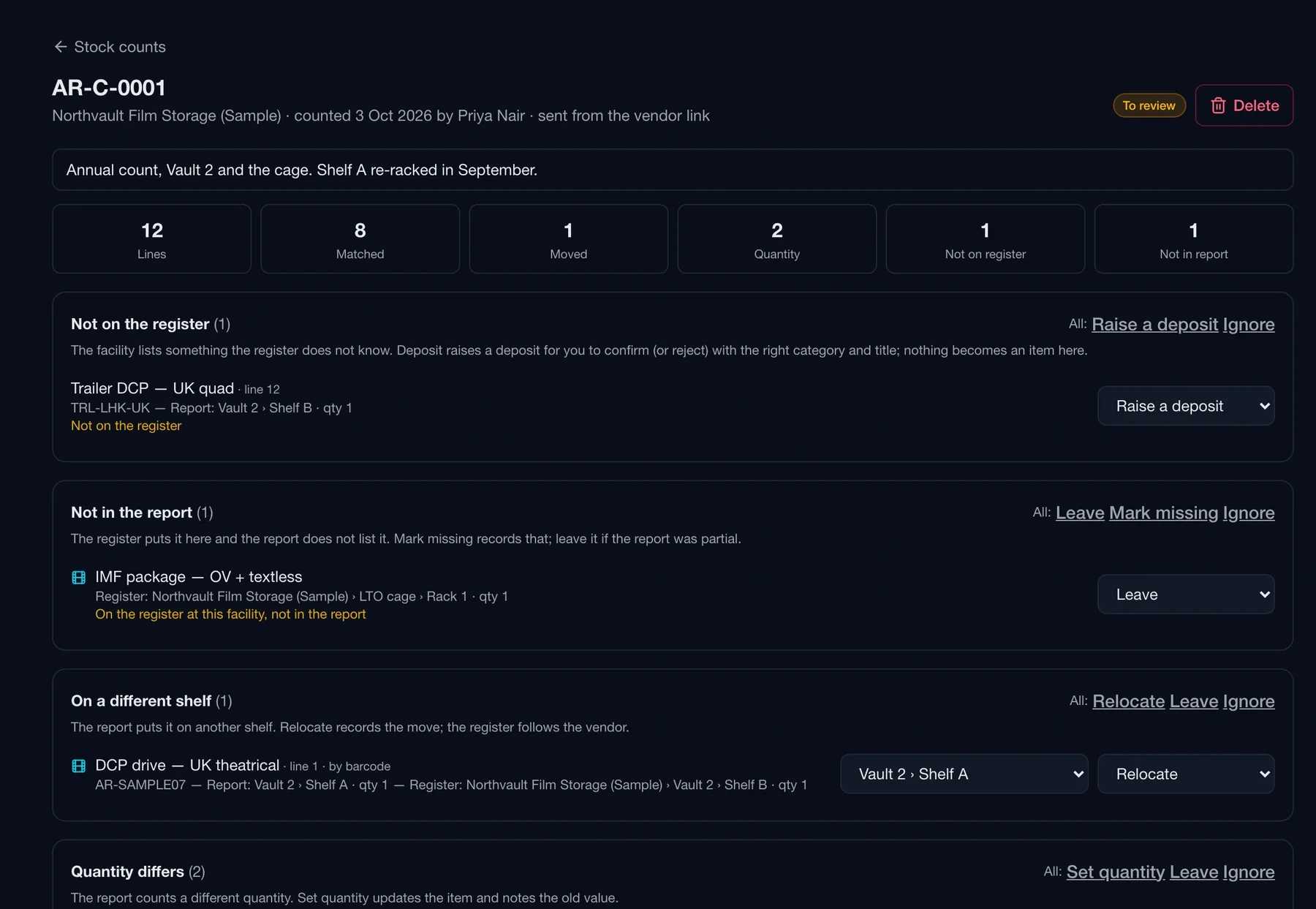
Once a year, or once a week, the vendor pastes their stock report on their link — barcodes, references, shelves, quantities. Routine matches every line by barcode, then reference, then name, and sorts the differences: moved shelves, different quantities, things they hold that you do not know about, things you think are there that they did not list. Pick an action per line and apply — movements, not edits.

Vendor link · Northvault Film Storage · Stock report
The vendor's stock report form with a counted-on date, a note, and a pasted CSV of barcodes, references, names, locations and quantities

The vendor's stock report. Pasted from their own export, columns matched by heading; the reports they have sent are listed with their status.

Archive · Stock counts · AR-C-0001
Routine stock count review showing lines matched, moved, quantity differs, not on register and not in report, with an action per line such as raise a deposit, relocate, leave or ignore

An action per line. Not on the register raises a deposit for you to confirm; on a different shelf relocates; quantity differs sets the quantity and notes the old value; not in the report marks it missing or leaves it.

Storage costs

Expected storage, from the log.

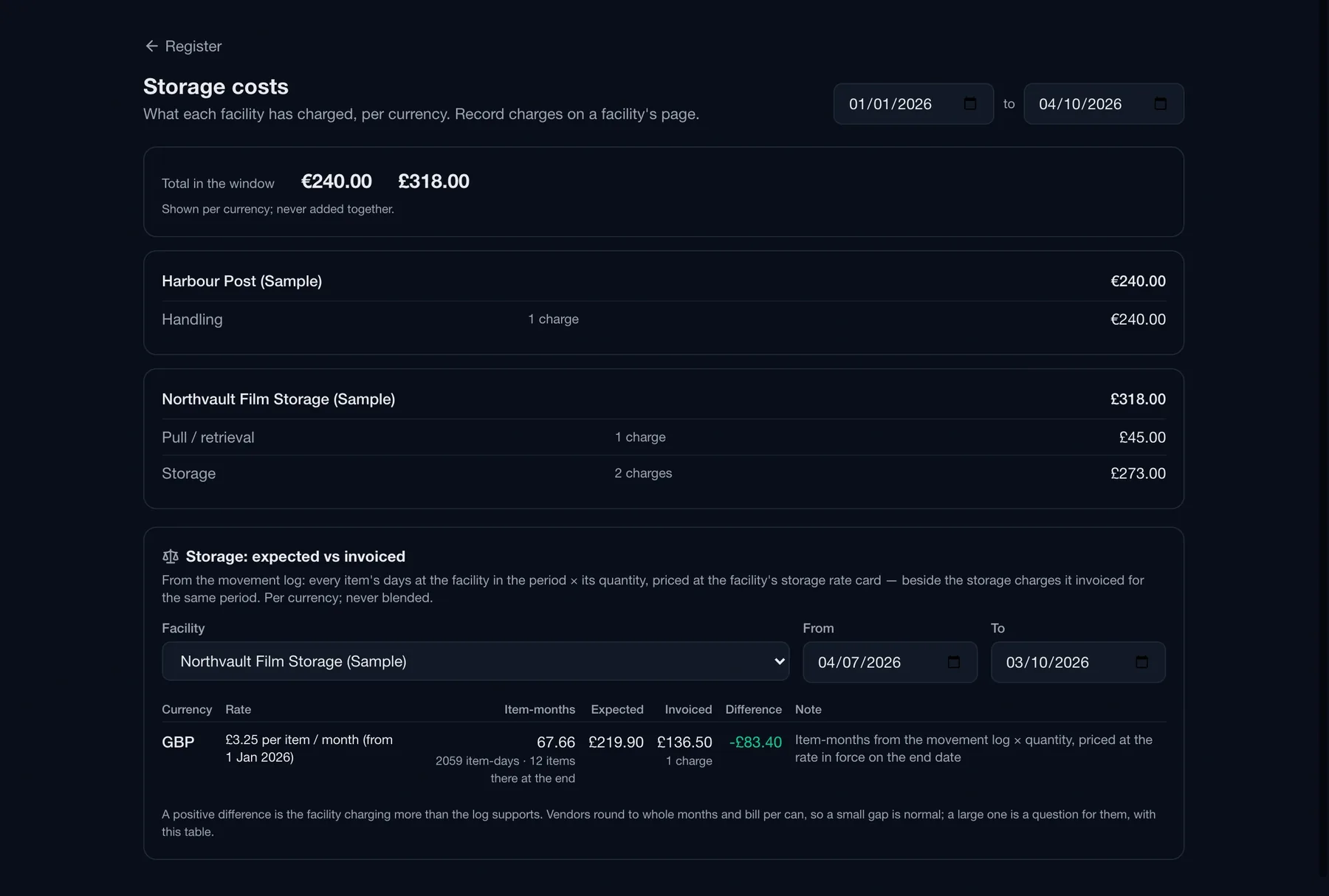
From the movement log, Routine works out the item-months each facility actually held, prices them at its rate card, and puts that beside what it invoiced for the period. A positive difference is the facility charging more than the log supports. Per currency, never blended.

Item-months, not guesses. Every item's days at the facility in the window, multiplied by quantity, priced at the rate in force on the end date.

Charges per facility. Pull, retrieval, handling and storage charges logged against each facility, with invoice references and totals per currency.

Hidden from crew. Rate cards, charges and the storage comparison are full-seat data; crew seats never see the money.

Archive · Storage costs
Routine archive storage costs page showing charges per facility in the window and an expected-versus-invoiced table of item-months, expected, invoiced and the difference per currency
Due

What needs attention.

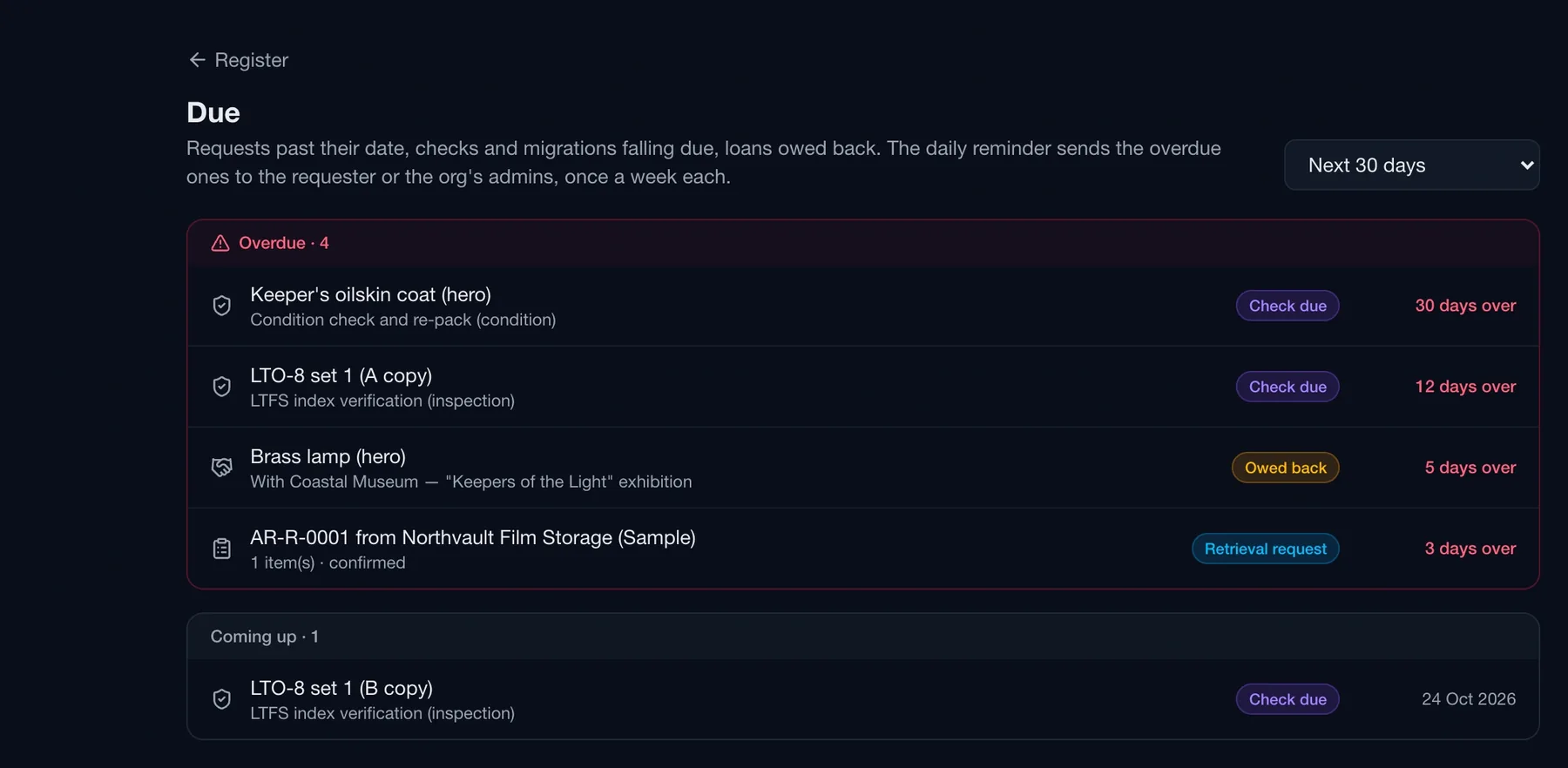
Requests past their date, checks and migrations falling due, loans owed back — one list, overdue first, and a daily in-app reminder to the requester or the organisation's admins, once a week each.

Archive · Due · Next 30 days
Routine archive due list with overdue items — a condition check, an LTO index verification, a loan owed back and a confirmed retrieval request — and upcoming checks
From wrap to archive

The production hands over its own manifest.

At wrap, Routine drafts a manifest from the production's script breakdown, costume plot and outstanding hire orders. Every line is decided — keep, return, dispose or skip — and hired kit can only be returned. Committing creates the kept lines as archive items at the chosen destination, carrying character, scenes and department from the plan.

Props and costumes keep their story. The hero prop knows which character carried it and in which scenes, because the breakdown told it.

Loans and disposals. Lend an item to a museum with a due-back date; record disposal proceeds per currency beside the charges.

Linked to Distribution. A DCP drive links to the Distribution version it holds, and the version page lists its archive elements.

Built for vaults and labs

The vendor works from one link. No account to manage.

Your facilities do not need Routine seats. Each gets a link scoped to its own site: requests to action, deposits to log, checks to report and stock reports to send. Every step they take is a movement on your register, and you are notified in the app as it happens.

Scoped to the facility. A vendor sees the requests, deposits, checks and stock reports for their own site and nothing else.

Replaceable at once. Switch the link off or replace it, and the old one stops working.

Sample set included. Load the Archive sample data and every screen on this page — register, facility, requests, deposits, counts, costs — is there to click through.

Get started

Elements in vaults around the world?

Try it free for 14 days — or tell us what you store, where, and who runs it, and we'll walk you through it.

No spam. No commitments.